Gemini Omni Flash Makes AI Video More Workflow-Native
Gemini Omni Flash Makes AI Video More Workflow-Native
June 30, 2026
Google has released Gemini Omni Flash, a preview multimodal video model built for fast generation and iterative editing through Google AI Studio and the Gemini API. The important part is not just that Google can now generate another short AI video. Congratulations, everyone, the timeline has survived another “we are so cooked” demo cycle. The real development is that Omni Flash is designed around conversational revision, multimodal inputs, and API access, which puts it closer to creative workflow infrastructure than a one-shot video toy.
For marketers, creators, and executives, that distinction matters. AI video has been impressive for a while. What has been less impressive is the operating reality: prompt roulette, inconsistent edits, tool hopping, unclear rights, and outputs that look great until someone asks for “the same thing, but with the product facing left.” Gemini Omni Flash is Google’s attempt to make short-form AI video more editable, more repeatable, and more callable from systems.
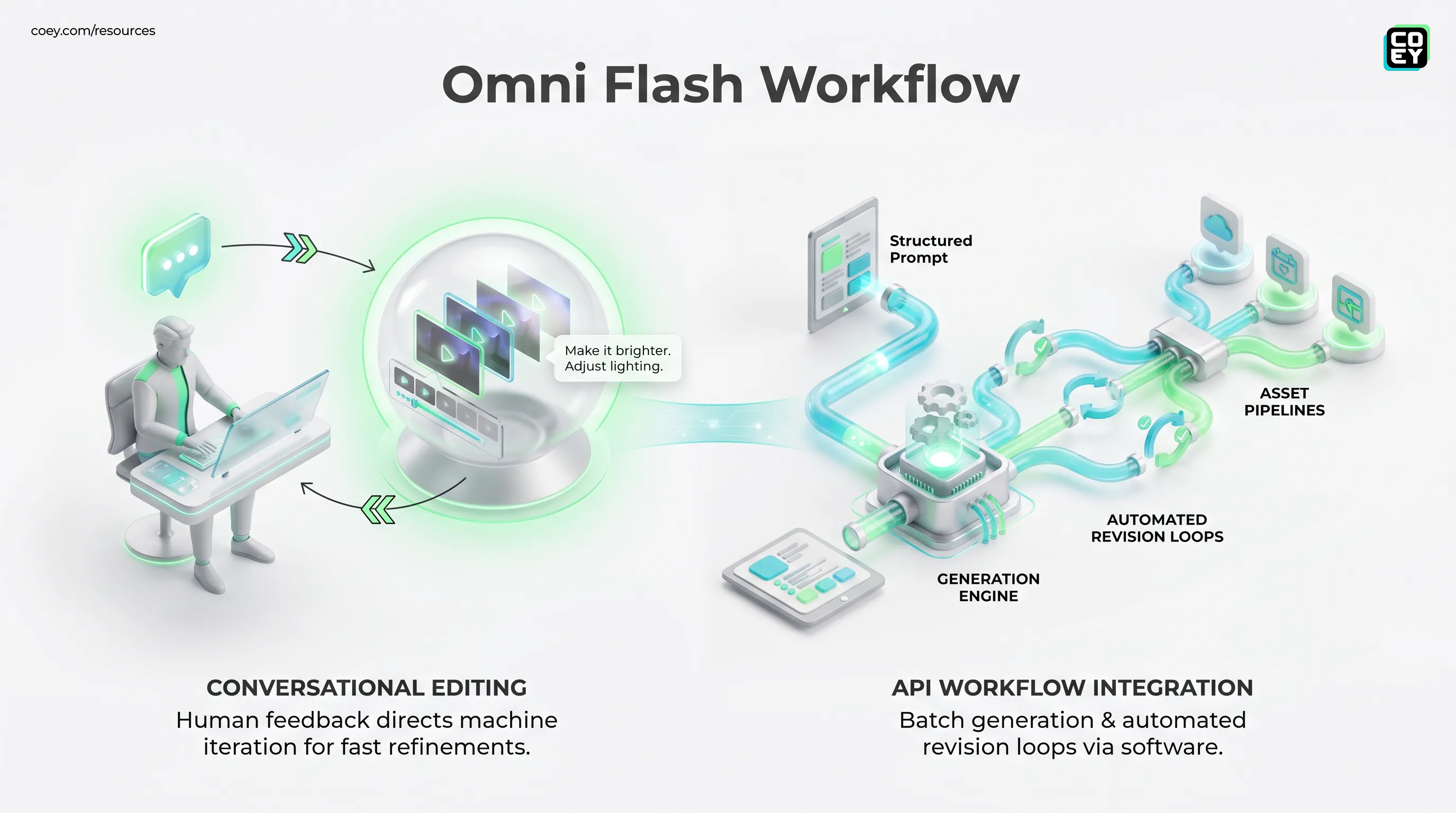
The headline is not AI makes videos faster. The headline is that Google is pushing video generation into a conversational, API-accessible workflow where humans can direct and machines can iterate.
What Google is shipping
Gemini Omni Flash is a preview model, listed under the model ID gemini-omni-flash-preview, aimed at short video generation and editing. It supports text-to-video, image-to-video, reference-guided generation, and video editing workflows, with outputs in the short-clip range rather than long-form production. Google’s current developer documentation describes generated clips in the roughly 3-to-10-second range, with 720p output at 24 frames per second in the documented preview setup.
That makes the target market pretty clear: social clips, campaign concepts, ad variants, product motion tests, storyboards, explainers, and quick creative exploration. This is not “replace your production company and shoot the Super Bowl spot by lunch.” It is much more useful than that, honestly. It is a fast draft engine for teams that need to move from idea to motion without turning every concept into a production meeting.
| Capability | What it does | Workflow impact |
|---|---|---|
| Text to video | Generates short clips from prompts | Fast concepting and storyboarding |
| Image to video | Animates still images or references | Useful for product and brand assets |
| Video editing | Refines existing short clips through follow-up instructions | Less restart-from-zero chaos |
Conversational editing matters
The most interesting part of Omni Flash is not the first generation. It is what happens after the first generation. Google’s Omni Flash creation and editing docs describe an interaction-based workflow where users can make follow-up requests against a prior generation. In practical terms: generate a clip, then ask for changes in plain language.
That changes the creative loop. Instead of rewriting the entire prompt and hoping the model remembers the vibe, users can ask for refinements like softer lighting, a different camera move, a product swap, a new background, or a more energetic scene. This sounds obvious because it mirrors how humans already give feedback. “Make it brighter” is normal. “Regenerate using the original prompt except now preserve subject identity, adjust lens compression, and please do not turn the sneaker into soup” is not normal. And yet that has basically been the AI video lifestyle.
Why this helps teams ship
Creative teams rarely need one perfect output. They need comparison sets. They need options. They need fast revisions after feedback from a client, CMO, founder, or that one stakeholder who joins late and says “can we make it pop?” like it is a legally binding incantation.
Conversational editing gives humans more leverage in that loop. The machine generates and revises at speed. The human keeps taste, intent, brand sense, and final judgment. That is the collaboration pattern that actually scales.
API access changes the stakes
Omni Flash is available through the Gemini API, which is the adult part of the announcement. A browser tool is useful. An API is infrastructure. Google’s documentation references the Interactions API pattern, where teams can create an interaction, then refer back to it for follow-up edits. For non-technical readers, that means the model is not trapped inside a pretty tab. It can be called by software.
That unlocks several practical workflows:
- Batch generation: create many video variants from a campaign brief, product feed, or structured prompt library.
- Automated revision loops: turn review comments into follow-up edits, then route new versions back for approval.
- Asset pipelines: send finished clips into cloud storage, DAM systems, editing queues, or social scheduling workflows.
- Creative testing: generate multiple hooks, backgrounds, or audience-specific versions for performance teams, while checking supported aspect ratios and export options in the current API documentation before building around them.
Can this plug into n8n, Make, Zapier-style workflows, or custom marketing ops systems? In principle, yes, if the workflow can call an HTTP API and handle files. In practice, teams still need middleware, authentication, storage, retries, cost controls, and human approval gates. API access gives you the wire. It does not magically build the electrical grid.
Translation: Omni Flash can become part of a content system. But if your system is a spreadsheet, three Slack channels, and vibes, the model is not the bottleneck.
How it fits Google’s stack
Omni Flash lands in a Google ecosystem that already includes Gemini for reasoning, Google’s image-generation models, Veo for higher-end video generation, Flow as a more production-oriented creative workspace, and Vertex AI for enterprise model access where supported. COEY previously covered the early signals around Gemini Omni moving video into the assistant layer, and this release makes that direction much more concrete.
The strategic move is clear: Google wants video creation to become part of the same multimodal workflow where teams already plan, write, analyze, and generate other creative assets. That matters because handoff friction is still one of the biggest hidden costs in AI-assisted production.
If a marketer can start with a brief, generate stills, animate them, refine the clip, and pass outputs into a campaign pipeline from the same broader platform, the workflow gets faster. Not because the machine has taste. It does not. But because the machine reduces the grind between creative decisions.
Where it is ready now
Omni Flash looks most ready for short-form, high-volume, iterative creative work. That is where speed and editability matter more than frame-perfect control. For social teams, performance marketers, ecommerce brands, agencies, and internal comms teams, this kind of model can compress the draft cycle dramatically.
| Use case | Readiness | Why |
|---|---|---|
| Social ad variants | High | Short clips and fast iteration fit the format |
| Product motion tests | High | Image-to-video works well for still assets |
| Final hero campaigns | Medium | Still needs editing, QA, and brand review |
The strongest early use case is not final delivery. It is decision acceleration. Omni Flash can help teams see more ideas in motion before committing production resources. That alone is valuable. More options earlier in the process means better human decisions later.
Where caution still belongs
This is still a preview model, and preview means teams should test before betting the production calendar on it. Short outputs are useful, but they are not a full video strategy. Visual consistency can still wobble. Edits may not always preserve every detail. Complex brand rules, regulated claims, product accuracy, likeness handling, and accessibility checks still require human oversight.
There is also the usual cost and quota reality. API-based video generation can get expensive fast when teams generate dozens of retries per concept, and teams should confirm the current Gemini API pricing page and quota limits before scaling usage. The smart workflow is not “generate until the universe gives you a banger.” The smart workflow is structured prompts, reusable templates, approval gates, and metrics like cost per approved asset.
Google’s broader Gemini API video documentation also shows that video capabilities differ by model family, task type, output duration, resolution, and availability. Translation: do not assume every Google video model does the same thing. Veo may be better for polished cinematic generation. Omni Flash may be better for fast, conversational iteration. Pick the tool based on the job, not the launch hype.
Why marketers should care
The bigger shift is that AI video is becoming less precious. For years, video was the expensive format. Every additional version meant more editing, more review, more cost, more people asking whether the logo was “two pixels too low.” Models like Omni Flash push video closer to the economics of copy and image variation: create more drafts, test more angles, refine faster, ship what earns it.
For executives, the message is simple: this is worth evaluating as a workflow component, not just a creative novelty. If your team produces short-form content, campaign variants, product explainers, or pitch visuals, Omni Flash could reduce time-to-draft and increase creative breadth. But the ROI depends on whether you connect it to the surrounding process: briefs, approvals, storage, performance feedback, and governance.
For creators and marketers, the human role becomes sharper. You are not replaced by a video model. You become the director of a faster machine collaborator. You define the brief, choose the references, judge the output, protect the brand, and decide what ships. The model handles more of the motion grunt work.
The bottom line
Gemini Omni Flash is a meaningful step toward workflow-native AI video: short-form generation, conversational editing, multimodal inputs, and API access in one Google-backed package. It is not a magic production department, and it is not yet a replacement for skilled editors, designers, producers, or brand leads. But it is exactly the kind of capability that can scale human creativity when wrapped in the right system.
The pragmatic read: use Omni Flash for fast drafts, variants, prototypes, and short-form creative loops. Build human review into anything public-facing. Watch quotas and costs. And pay close attention to how Google connects Omni Flash with the rest of its Gemini, Veo, Flow, and Vertex ecosystem. The winners will not be the teams making the flashiest one-off clip. They will be the teams turning models like this into repeatable creative operations where humans lead, machines multiply, and the content calendar finally stops looking like a hostage situation.