
Route every brief before anyone writes
Discover how to build an AI-powered brief routing system that can take messy campaign requests and transform them into structured, review-ready briefs. Learn the blueprint for combining automation, best practices, and a human-in-the-loop workflow to streamline creative operations without losing your team's voice or strategy. Explore practical steps, safeguards, and the right tools to make content production faster, smarter, and way less chaotic.
1 July 2026Team COEY
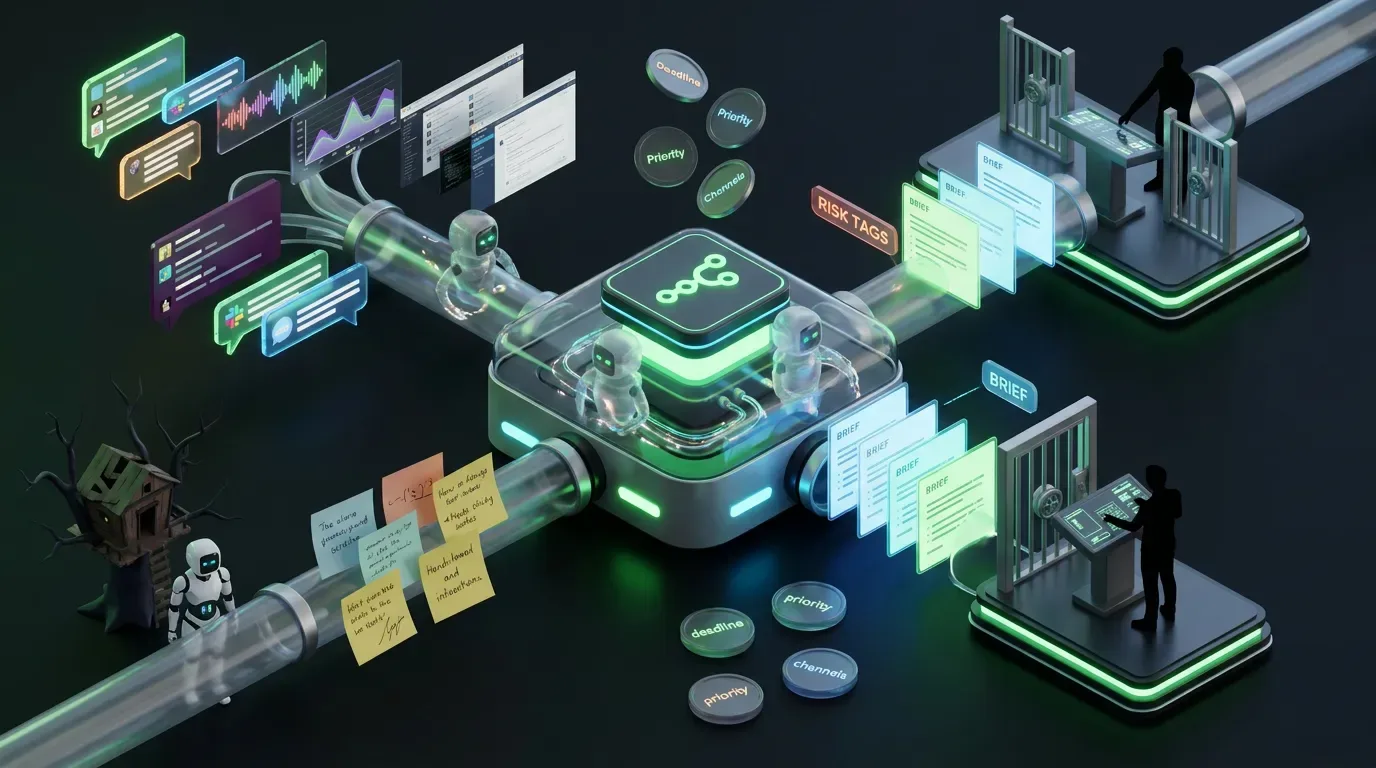
Most teams do not have an ideas problem. They have a brief problem.
Campaign requests arrive as Slack rambles, half-finished docs, voice notes, screenshots, and the occasional masterpiece titled final_v9_really_final. Then someone has to translate that chaos into a usable creative brief, route it to the right people, and make sure the output still sounds like the company and not a caffeinated autocomplete intern. This is where an AI creative brief router becomes absurdly useful. If you are building on n8n, the timing is especially good because its current platform direction keeps pushing harder into agentic workflows, tool use, and broader orchestration.
The goal is simple: turn messy inbound requests into structured, usable, reviewable briefs that move into production faster. Not autopublished. Not unsupervised. Not some unholy content vending machine. A proper human-in-the-loop workflow where people set strategy and constraints while AI handles structure, synthesis, and first-pass routing.
That matters even more now because the AI stack is getting more workflow-aware and more embedded inside business systems. At the same time, access to top-end models is still uneven. New model availability, pricing, and rollout patterns keep shifting across vendors, which means the safer move is to design systems where the workflow matters more than the hype cycle.
What problem this automation solves
Creative operations break down in the same place over and over:
Requests come in unstructured.
Important context gets buried.
Teams waste time asking the same follow-up questions.
Brief quality depends too much on who received the request.
Content and campaign work start without clear goals, constraints, or owners.
An AI brief router fixes the ugly middle between request and execution.
It helps you:
standardize intake
extract goals, audience, offers, and channels
flag missing inputs before production starts
route briefs by type, risk, and priority
generate first-pass brief drafts for human review
create downstream tasks in your project system
Automation should not replace strategic thinking. It should stop your strategists from spending half their day decoding vague requests like digital archaeologists.
The mental model
Think of this as a four-layer system.
| Layer | What it does | Human role |
|---|---|---|
| Intake | Collects messy requests from forms, Slack, email, or CRM | Define required fields and submission rules |
| Interpretation | Uses AI to structure the request into a draft brief | Set prompt rules and output format |
| Governance | Checks for missing info, risk, and routing logic | Approve, reject, or revise |
| Execution | Creates tasks, docs, and handoffs in your systems | Own final decisions and production quality |
The big idea is boring in the best possible way: structure first, generation second.
If you ask AI to create without a clean intake layer, it will improvise. Sometimes that looks smart. Sometimes it looks like your quarterly launch brief was written by a motivational wallpaper account.
Tools and systems involved
You can build this in plenty of stacks, but here is a practical setup:
Orchestration: n8n
Input sources: Typeform, Tally, Notion Forms, Slack, email, HubSpot forms
LLM layer: a model tier selected by cost, speed, and reliability
Project system: Asana, ClickUp, Monday, Jira, or Notion
Docs: Google Docs or Notion
Notifications: Slack or Teams
Why n8n? Because it is good at being the grown-up in the room. It can ingest triggers, transform payloads, call models, branch logic, wait for approvals, and push clean outputs into the systems your team already uses.
That matters more now because n8n’s recent direction has leaned further into AI agent tooling and better control over complex automation paths. Great for capability. Also a reminder that workflow security is not optional. If you expose external tools, credentials, or agent actions without guardrails, you are not building a sleek AI system. You are building a haunted treehouse with API keys.
Where AI adds leverage
AI is excellent at compressing repetitive cognitive work.
In this workflow, it can:
summarize long or messy requests
extract campaign goals, target audience, channel needs, and deliverables
normalize inconsistent language into a standard brief format
identify missing information
suggest priority and routing tags
draft a clean first-pass creative brief
This is leverage, not authorship. The AI is not deciding the campaign strategy. It is helping your team get from chaos to clarity faster.
Where humans must stay in control
Defining what a good brief actually includes
Setting brand voice and strategic constraints
Approving or editing every generated brief
Reviewing legal or compliance-sensitive asks
Choosing what gets staffed, prioritized, or killed
If your brief router can kick off public-facing creative without human approval, congratulations, you built a faster way to make preventable mistakes.
Guardrails before you automate anything
This is the part many teams skip because it is less fun than prompts. It is also the part that keeps the system useful.
| Guardrail | Implementation | Why it matters |
|---|---|---|
| Required fields | Minimum inputs for goal, audience, CTA, channel, deadline | Prevents the AI from inventing strategy |
| Approval gate | Human review before routing to production | Protects brand and prioritization logic |
| Risk tagging | Flag regulated, legal, pricing, or claim-heavy requests | Routes sensitive work for extra review |
Also useful:
maintain a list of forbidden phrases or unsupported claims
define campaign types clearly
use structured output schemas, not open-ended prose
log every input, output, and approval step
The workflow blueprint
Step 1: Capture requests from wherever your team actually works
Do not force all requests into one pristine portal if your team lives in six different places. Meet reality where it is.
Your router should accept inputs from:
form submissions
Slack messages in a request channel
email aliases
CRM deal stages
project kickoff notes
In n8n, this usually means multiple triggers feeding one normalization path.
The key is mapping all inputs into the same internal schema.
Step 2: Normalize the raw request
Before AI touches it, clean the data.
remove signatures and footer junk
standardize date formats
map request source
attach any linked docs or assets
identify requester and department
This step sounds unglamorous because it is. It is also why the system works.
Step 3: Ask the model for structured extraction
Do not ask for “a better brief.” Ask for fields.
Use a schema like this:
{
  "request_type": "campaign|content|ad|email|landing_page|other",
  "business_goal": "",
  "target_audience": "",
  "primary_offer": "",
  "call_to_action": "",
  "deliverables": [""],
  "channels": [""],
  "deadline": "",
  "missing_information": [""],
  "risk_flags": [""],
  "suggested_priority": "low|medium|high",
  "draft_brief": {
    "objective": "",
    "audience": "",
    "message": "",
    "deliverables": [""],
    "constraints": [""],
    "success_metrics": [""]
  }
}
That way the AI becomes a parser and formatter, not a wandering poet.
Step 4: Validate and enrich
Once you get structured output, run logic checks.
Is the goal missing?
Is the deadline unrealistic?
Does the request mention pricing, regulated claims, or partner brands?
Are there attached assets?
Does the campaign map to an existing initiative?
You can also enrich from internal systems:
pull audience segments from CRM
attach brand guidelines based on business unit
pull campaign taxonomy from your PM tool
This is the difference between an isolated AI toy and a real business workflow. Context wins.
Step 5: Route by type and risk
Not every brief should go to the same place.
Example routing logic:
Content brief: route to editorial lead
Paid social brief: route to performance creative team
Sales enablement brief: route to revenue marketing
High-risk claim brief: route to legal review first
This is where n8n earns its keep. One clean Switch node can save your team from Slack pinball.
Step 6: Create the review packet
Before anything moves into production, package the output for human review.
That packet should include:
original request
AI structured summary
missing inputs
risk flags
draft brief
suggested owner
approval buttons or status fields
Push it into Notion, Asana, or Slack. Keep it visible and easy to edit.
Step 7: Only after approval, create downstream tasks
Once a person approves the brief, trigger the next workflow:
create tasks in your PM system
generate a doc page
assign owners
attach supporting assets
optionally create first-pass AI drafts for copy or concepts
Notice what did not happen: the system did not skip straight to publishing. Because we enjoy staying employed.
What this looks like in n8n
Trigger node from form, Slack, or email
Set or Function node for normalization
LLM call for structured extraction
JSON validation node
Enrichment step from CRM or docs
IF or Switch nodes for risk and routing
Create page or task in project system
Slack approval notification
Wait for approval
Downstream task creation or draft generation
Model choice without getting weird about it
You do not need the fanciest model for every step.
In fact, the current market makes that clearer than ever. Some frontier systems are excellent but unevenly available, while balanced models are getting better at exactly this kind of structured operational work. The lesson is not pick one winner forever. The lesson is design the workflow so model swaps do not break the machine.
Use a simple tiered approach:
Fast, cheap model: classify request type and extract obvious fields
Balanced model: draft the brief and identify missing info
Higher-end model: only for complex, technical, or sensitive requests
This is not just cost control. It is systems hygiene.
Tradeoffs and constraints
Bad input still creates mediocre output.
Teams may resist structured intake at first.
AI can confidently misread vague requests.
Over-automation can create review fatigue if every minor ask becomes a formal packet.
Security matters if briefs contain customer, legal, or product-sensitive data.
Also, do not let the workflow become more complicated than the work it is meant to support. If your router needs fourteen approvals to generate a blog brief, you have built bureaucracy with nicer branding.
How to measure success
| Metric | What to measure | Why it matters |
|---|---|---|
| Time to approved brief | Request submission to human-approved brief | Shows operational speed gain |
| Brief completeness rate | Percent of briefs approved without major revision | Shows quality of intake and extraction |
| Reviewer time saved | Average time to review versus writing from scratch | Proves leverage, not busywork |
Why this is really a systems problem
Anyone can ask AI to write a brief.
The hard part is building a loop where requests come in messy, get structured consistently, pass through the right guardrails, and move into real production without losing strategic context.
That is not a prompt problem. It is a systems problem.
And that is the larger lesson for teams trying to operationalize AI in marketing: the value is rarely in the model alone. It is in the orchestration, routing, constraints, approvals, and handoffs around it. If you want another example of that bigger shift, COEY recently covered how Gemini Omni Flash is making AI video more workflow-native.
Humans define the brief standard. AI accelerates the messy middle. Systems turn that into repeatable output.
That is how you scale creativity without turning your operations into a content haunted house.