ChatGPT Images 2.0 Pushes AI Visuals Closer to Real Workflow Territory
ChatGPT Images 2.0 Pushes AI Visuals Closer to Real Workflow Territory
April 21, 2026
OpenAI has launched ChatGPT Images 2.0, a major refresh to image generation and editing inside ChatGPT that looks less like a novelty upgrade and more like a serious attempt to make AI visuals useful in production. That distinction matters. We are well past the phase where “wow, it made a pretty robot” counts as product strategy. The bar now is whether a model can hold layout, follow instructions, render readable text, and fit into the kinds of creative systems marketers and operators actually run. On that front, Images 2.0 looks like a meaningful step forward, with a few adult-supervision caveats still intact.
For executives, the headline is simple: OpenAI is tightening the loop between ideation and asset creation inside ChatGPT. For marketers and creators, the more important question is whether this can scale beyond one-off prompting into repeatable output. The answer appears to be yes, partly now and more over time, because OpenAI’s broader image stack is already supported through its API documentation, including image generation and edit flows in the OpenAI image docs.
The useful shift here is not “AI images got nicer.” It is that image generation is becoming more controllable, more editable, and more automatable, which is exactly what has to happen before it becomes real creative infrastructure.
What OpenAI actually shipped
OpenAI is positioning Images 2.0 as a more capable visual mode inside ChatGPT, with stronger prompt adherence, better structured output, cleaner text rendering, and a tighter edit loop. That may sound like a standard model-release word salad, but in image generation those details are the difference between “shareable demo” and “usable first draft.”
The biggest upgrades appear to center on four areas:
- Better instruction following: more reliable handling of complex prompt constraints, including composition, objects, style, and messaging intent
- Improved text rendering: a huge deal for posters, social graphics, mockups, and ad creative where garbled copy has been the eternal jump scare
- More coherent layouts: stronger handling of multi-panel, structured, or placement-sensitive visuals
- Native editing flow: users can generate and revise within the same conversation instead of rerolling from zero like a casino machine with a design degree
OpenAI has also continued expanding the underlying image model stack beyond the old DALL·E framing, which matters because this is no longer just about a consumer-facing button in chat. It is increasingly an image layer inside a broader multimodal platform.
Why text is the real headline
If you work in marketing, design ops, or content production, you already know the truth: text has been the Achilles’ heel of AI image generation. Not aesthetics. Not “creativity.” Text. The ability to place readable words inside an image without summoning cursed pseudo-font goblin energy has been the thing separating concept art from usable assets.
That is why Images 2.0 matters more than the usual “higher quality visuals” talking point. Better typography and text handling push AI image generation into more commercially relevant territory:
- campaign graphics with readable offers and CTAs
- localized creative for multiple regions, with the usual caveat that non-English rendering still needs checking
- presentation and pitch visuals that do not require a cleanup marathon
- mockups and structured layouts that can survive client review without immediate embarrassment
This is also where OpenAI is clearly tracking the same market pressure we have seen across the category. As we noted in our earlier coverage of OpenAI’s image stack, the conversation has shifted from visual quality to workflow viability. Useful beats gorgeous if you are trying to ship.
| Old problem | What Images 2.0 improves | Why teams care |
|---|---|---|
| Unreadable text | Cleaner on-image copy | Less manual cleanup |
| Loose composition | Better layout control | Faster approvals |
| One-shot generation | Integrated edits | More realistic iteration |
The edit loop gets tighter
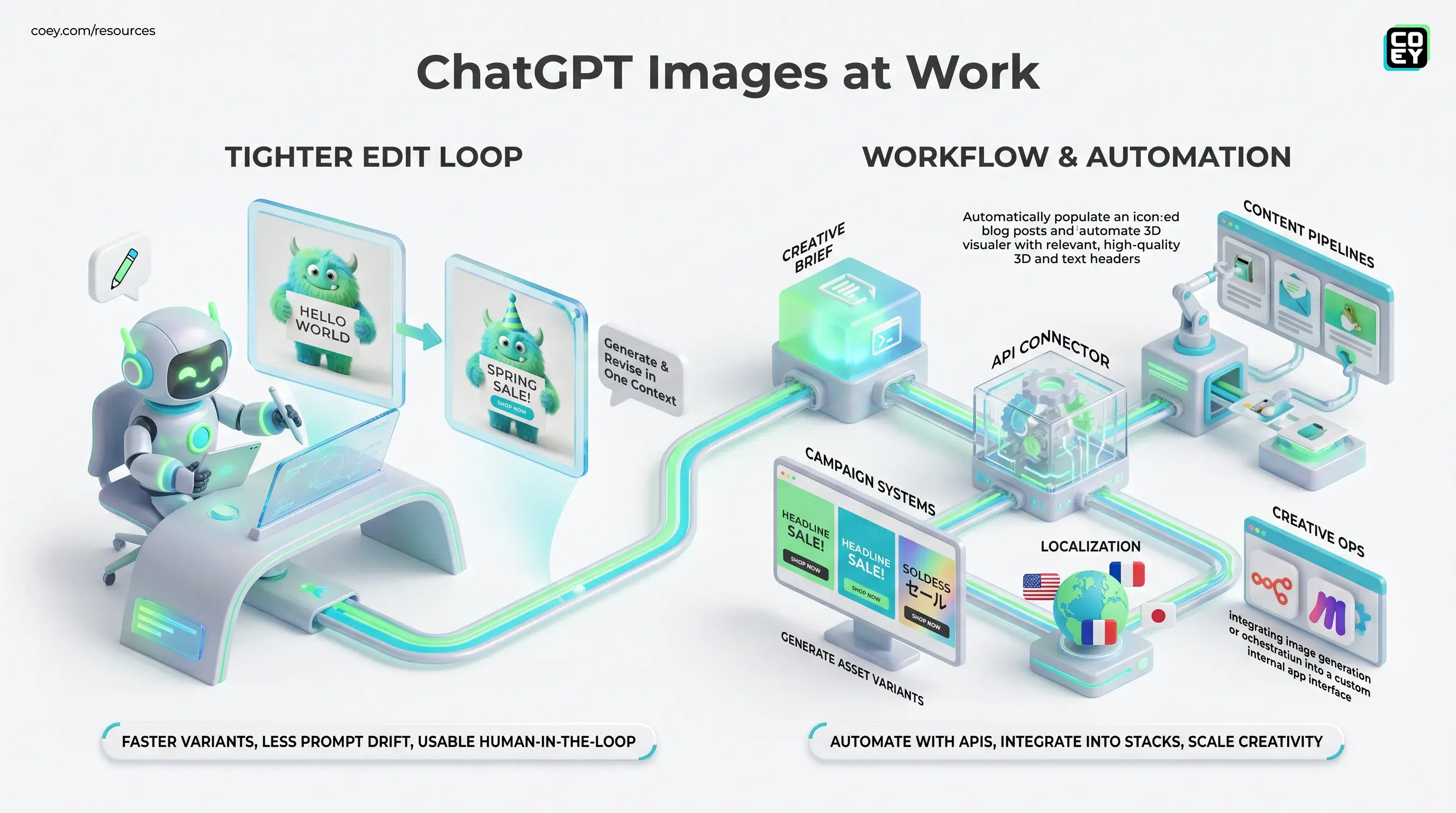
The most practical part of this release may be the “generate plus edit” experience inside ChatGPT. This is not just a quality story. It is a workflow story.
When users can generate an image, then immediately revise text, preserve context, tweak composition, and ask for variants inside the same thread, the tool starts behaving more like a collaborator and less like a vending machine. That matters because most creative work is iterative. Nobody serious gets the final answer on the first prompt unless the task is trivial or the standards are on vacation.
For teams, this tighter loop helps in three ways:
Faster varianting
Need five ad concepts with different headline treatments or backgrounds? That becomes much faster when the base image, instructions, and revisions live in one context window.
Less prompt drift
In theory, maintaining prior context should make revisions more stable. That means fewer situations where a small copy change somehow turns your product mockup into a surrealist fever dream.
More usable human-in-the-loop work
This is the sweet spot. Humans set direction, make judgment calls, and refine the message. The model handles the repetitive production work. That is exactly the kind of collaboration that scales creativity rather than flattening it.
Can you automate it?
Mostly yes, and this is where the story gets much more interesting than the chat UI alone.
OpenAI’s image tooling is represented in its API ecosystem, with support for generation and editing workflows documented in the platform and Help Center, including image masking and image-to-image editing guidance in the GPT Image API overview. In plain English: this is not locked inside a pretty interface forever.
That means teams can potentially wire image generation into:
- content pipelines that create supporting visuals for blogs, emails, and landing pages
- campaign systems that generate asset variants from approved briefs
- localization workflows that adapt images by language or market
- creative ops stacks using orchestration layers like n8n, Make, or custom internal apps
For non-technical readers, the practical checklist looks like this:
| Question | Answer now | What it means |
|---|---|---|
| Can it be automated? | Yes | Can fit into workflows via API |
| Is it UI-only? | No | More useful for scale |
| Is it fully hands-off? | Not wisely | Still needs review and guardrails |
Where it looks ready now
The strongest use cases are not “replace the design team.” Please log off if that was your first thought. They are the repetitive, high-volume, first-draft-heavy lanes where speed matters and human taste still closes the loop.
Ad creative and social assets
This is probably the clearest win. Teams constantly need variants: new hooks, different text overlays, alternate crops, localized language, seasonal swaps. If Images 2.0 holds structure and text more reliably, it becomes much more viable for first-pass ad production.
Mockups and presentation visuals
Creative teams often need polished-enough visuals fast, especially for pitches, internal strategy decks, or campaign concepts. Better layout handling makes this more than a mood-board toy.
Storyboards and multi-panel work
OpenAI is also emphasizing stronger handling of structured and multi-panel outputs. If that holds up in daily use, it matters for comics, storyboard frames, explainer content, and video previsualization.
Where the hype needs a seat
This update is promising, but let’s keep one foot on the floor.
Better text rendering does not mean perfect typography. Better layouts do not mean pixel-perfect design software replacement. And API access does not magically turn a model into a mature production system. It just means the system can be built.
Three caveats still matter:
- Dense text remains risky: short labels and headlines are one thing; long blocks of copy still need checking
- Latency may matter: richer outputs and edits can be slower, which affects batch workflows
- Governance is still your job: approvals, brand constraints, rights review, and claims validation do not disappear because the images got smarter
API-ready does not mean autopilot-ready. The winning setup is still human judgment plus machine speed, not “ship whatever the model made and pray the logo is spelled right.”
Bottom line
ChatGPT Images 2.0 looks like a real upgrade because it improves the parts of image generation that determine whether a tool can survive contact with actual work: text, layout, iteration, and integration. That makes it more relevant to marketers, operators, and creative teams trying to scale output without scaling grind.
The biggest signal is not that OpenAI made image generation more impressive. It is that the company keeps pushing visual creation into the same broader stack as chat, editing, and APIs. That is how these tools stop being isolated tricks and start becoming collaborative infrastructure.
For teams building with human plus machine systems, that is the real news. Not prettier pictures. Better leverage.