
CRM personalization without losing the plot
A clever guide for marketers on automating CRM personalization using human-in-the-loop systems with AI and n8n, while keeping brand voice, compliance, and oversight intact. Covers common pitfalls, tech stack setup, core workflow blueprint, and key measurement metrics. Stay smart, stay in control, and avoid the chaos of unchecked automation.
3 July 2026Team COEY
Automate CRM Personalization Without Losing Brand Control
n8n is a strong orchestration layer for AI-assisted CRM personalization because this is not a one-prompt parlor trick. It is a systems problem. Most CRM personalization is still trapped in one of two bad eras. Era one is manual chaos: someone exports a list, hand-builds segments, writes five variants, forgets suppression logic, and calls it personalization because the first-name token technically worked. Era two is the opposite failure: teams let AI spray relevance-shaped content across channels without enough context, approvals, or limits. The result feels technically personalized and spiritually off. Sometimes worse, it is wrong in a way that screenshots beautifully.
The better path is a human-in-the-loop personalization system. Humans define strategy, offer logic, voice, legal boundaries, and escalation rules. AI helps interpret signals, summarize customer state, draft message variants, and prepare next actions at a speed nobody wants to do manually. Automation moves the payload through the stack. Humans stay in charge of what actually goes live.
This matters even more now because the market is shifting from campaign sends to always-on decision systems. Platforms like HubSpot’s latest Breeze and Growth Context updates and Salesforce’s Agentforce Marketing push are both nudging teams toward more autonomous recommendations, more real-time decisions, and more agent behavior. Useful, yes. Also a fast way to industrialize bad judgment if your system design is lazy.
What problem this automation solves
CRM personalization tends to break in the same familiar places:
Customer data lives in too many systems.
Segments go stale before campaigns ship.
Message variants sound generic or drift off-brand.
Lifecycle triggers fire without enough context.
High-risk communications do not get reviewed properly.
Teams cannot scale testing without creating operational sludge.
A good AI-assisted CRM personalization workflow fixes the ugly middle between customer signal and customer message.
It helps you:
unify signals from CRM, product, support, and content systems
score intent and lifecycle changes in near real time
draft channel-specific message variants
route risky or high-impact outputs to human review
push approved content into email, SMS, and onsite systems
learn from outcomes without giving the machine the car keys
Automation is not personalization. Good system design is personalization. Automation just keeps it moving.
The mental model
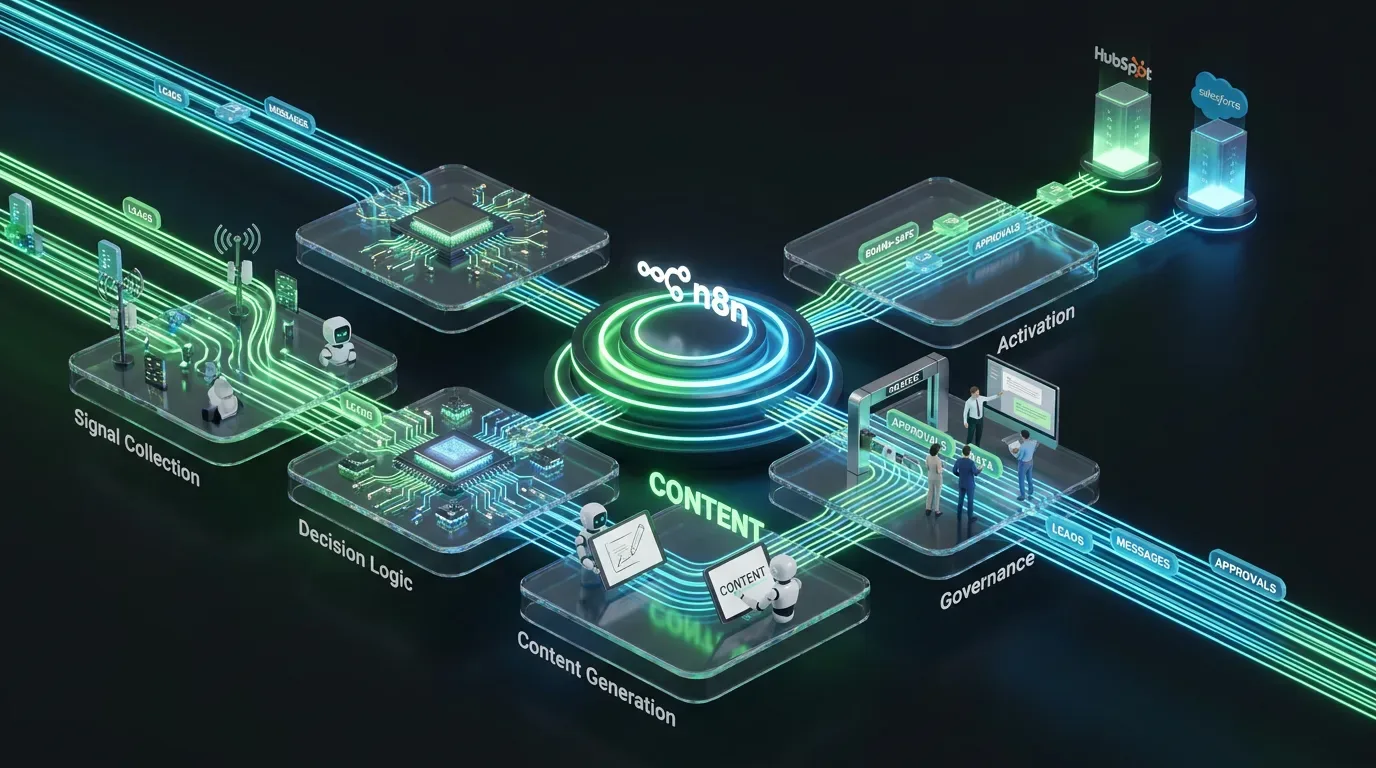
Think of this as a five-layer stack.
| Layer | What it does | Human role |
|---|---|---|
| Signal collection | Pulls data from CRM, web, product, support, and campaign tools | Define which signals matter |
| Decision logic | Classifies intent, lifecycle stage, and next best action | Set business rules and thresholds |
| Content generation | Uses AI to draft message variants and recommendations | Set voice, constraints, and approved offer logic |
| Governance | Applies review gates, compliance checks, and risk routing | Approve, reject, or revise |
| Activation | Sends approved outputs to CRM and campaign systems | Own final send and measurement strategy |
The important idea is simple: separate decisioning from generation.
If you ask AI to both decide the strategy and write the message from messy inputs, it will happily improvise. That is adorable in a brainstorm. Less adorable in lifecycle marketing.
Tools and systems involved
You can build this in several stacks, but here is a practical version:
Orchestration: n8n
CRM: HubSpot, Salesforce, or a CDP-backed CRM setup
Behavioral data: product analytics, event tracking, support platform, website activity
Campaign systems: email, SMS, push, or onsite personalization tools
LLM layer: one or more current models selected by cost and task type
Review layer: Notion, Airtable, Asana, Slack, or your internal approval queue
Why n8n? Because this is not a single prompt problem. It is an orchestration problem. You need triggers, branching, data cleanup, model calls, approvals, retries, and logging. That is workflow territory.
It also helps that n8n’s recent platform direction has leaned harder into publish controls, workflow tooling, and more governable automation patterns. Good. The market needs more “can this survive production?” and less “look what happened in the demo.”
Where AI adds leverage
AI is useful here for fast cognitive compression, not final authority.
It can:
summarize a contact or account state from multiple signals
classify likely intent or lifecycle movement
suggest the next best message angle
draft variants for email, SMS, and in-app messaging
adapt tone by segment while staying inside brand rules
identify missing context before a send
generate structured recommendations for a human reviewer
That is real leverage. Nobody on your team needs to manually synthesize fifty account signals just to draft a nurture email that still needs legal review.
Where humans must stay in control
Defining customer segments and lifecycle stages
Choosing what counts as a meaningful signal
Approving offers, claims, and pricing language
Setting voice rules and brand boundaries
Reviewing sensitive or high-value communications
Deciding what success looks like
If your AI can change customer messaging strategy and publish it without review, you did not build personalization. You built a faster path to avoidable nonsense.
Guardrails before you automate anything
This is the part people skip because prompts are more fun than governance. That is how teams end up debugging trust issues in public.
| Guardrail | Implementation | Why it matters |
|---|---|---|
| Approved signal list | Only allow defined CRM and behavioral fields into decision logic | Prevents random data from steering messaging |
| Offer constraints | Restrict promotions and pricing to approved lookup tables | Stops invented discounts and mixed messaging |
| Human approval gate | Require review for high-risk, high-value, or customer-facing changes | Protects brand and legal posture |
Also useful:
maintain channel-specific tone rules
ban unsupported claims and sensitive inferences
log every input, output, and approval action
use confidence thresholds so the model can abstain
separate low-risk automations from high-risk ones
The workflow blueprint
Step 1: Collect the right signals
Do not start with every possible data source. Start with the signals that actually influence messaging.
Examples:
CRM lifecycle stage
recent product usage
last conversion event
support ticket status
content consumed
email engagement
account tier or contract value
In n8n, these can flow in from webhooks, scheduled pulls, or event triggers. Normalize them into a shared schema before the model sees anything.
Step 2: Create a customer state snapshot
This is one of the most useful steps and one of the most ignored.
Instead of handing the model raw event spaghetti, create a structured snapshot like:
{
  "contact_id": "",
  "segment": "trial_user",
  "lifecycle_stage": "activation",
  "recent_behaviors": ["viewed_pricing", "used_feature_x_twice"],
  "support_status": "open_ticket",
  "last_campaign_engagement": "clicked",
  "eligible_offers": ["demo_call", "case_study"],
  "risk_flags": ["open_support_issue"]
}
This keeps the system grounded. You are giving the model context, not a scavenger hunt.
Step 3: Use rules first, then AI
Before generation happens, run deterministic logic.
If support issue is open, suppress upsell messaging.
If account is enterprise, route to account-based track.
If recent purchase happened, stop introductory nurture.
If consent is missing, do not activate that channel.
This part should not be delegated to vibes.
Then let AI handle the variable layer:
what angle fits this customer state
how to phrase the message by channel
which objections or motivations to address
Step 4: Ask the model for structured output
Do not ask for “a personalized message.” Ask for machine-usable fields.
{
  "recommended_action": "send_email|send_sms|hold|route_to_human",
  "message_goal": "",
  "reasoning_summary": "",
  "draft_email_subject": "",
  "draft_email_body": "",
  "draft_sms": "",
  "risk_flags": [""],
  "confidence_score": 0,
  "human_review_required": true
}
This keeps the output usable inside the workflow and easier to audit later.
Step 5: Route by risk and value
Not every personalized message deserves the same treatment.
Low risk: nurture reminders, educational content, onboarding nudges
Medium risk: offers, trial conversions, retention prompts
High risk: pricing changes, regulated claims, VIP outreach, churn recovery
Use n8n Switch or IF nodes to send each path where it belongs.
Low-risk paths might move forward with lightweight review or automated QA. High-risk paths should stop for a human.
Step 6: Build a review packet humans can actually use
Your reviewer should not have to reverse-engineer what the machine did.
Include:
customer state snapshot
recommended action
draft message
risk flags
why the system suggested it
approve, edit, or reject controls
Push this into your task or approval system. Slack can work too, but do not make mission-critical reviews disappear into channel scroll.
Step 7: Activate only approved outputs
Once approved, the workflow can push content into your campaign system, update CRM fields, log the event, and schedule follow-up measurement.
That means:
create or update the email draft
send the SMS payload to your messaging platform
log the content version used
append the outcome to the contact timeline
queue follow-up analysis after send performance returns
Again, no blind auto-publish. We are trying to scale intelligence, not public mistakes.
What this looks like in n8n
Webhook or Schedule Trigger
CRM and analytics data pulls
Set or Function node for normalization
Rules layer using IF or Switch nodes
LLM node for structured recommendation output
JSON validation
Risk routing logic
Create record in review system
Slack or email approval notification
Wait node for approval
Campaign platform activation node
Post-send logging and measurement update
Model choice without pretending there is one forever winner
You do not need the biggest model for every personalization task.
Use a tiered approach:
Fast cheap model: classify intent, summarize signals, draft low-risk variants
Balanced model: generate nuanced email copy and channel adaptations
Higher-end model: only for complex accounts, sensitive messaging, or hard edge cases
This matters because agentic CRM workflows can get expensive fast. Great automation is not only accurate. It is sustainable.
If you want the bigger pattern, we have already been covering how workflow quality increasingly matters more than raw model theater on the COEY blog. Same lesson, different use case: the model matters, but the orchestration matters more.
Tradeoffs and constraints
Bad CRM data still poisons good automation.
Over-personalization can feel creepy fast.
LLMs can produce persuasive but strategically dumb copy.
Review queues can become bottlenecks if risk tiers are too broad.
Always-on personalization requires stronger measurement discipline than one-off campaigns.
Also, not every customer interaction needs personalization. Sometimes the best message is the clear message, not the weirdly intimate one.
How to measure success
| Metric | What to measure | Why it matters |
|---|---|---|
| Time to approved message | Signal trigger to human-approved output | Shows workflow speed gain |
| Approval rate | Percent of AI drafts approved with minor edits | Shows output usefulness |
| Lift by segment | Conversion or engagement improvement versus baseline | Shows whether personalization is actually working |
Why this is really a systems problem
Anyone can ask a model to write a personalized email.
The hard part is creating a system where customer signals are trustworthy, decisions are bounded, messages are reviewable, and activation happens cleanly across the stack. That is where most teams either build leverage or build a very expensive content slot machine.
This is why CRM personalization is not mainly a copy problem. It is a systems problem.
Humans define what good personalization means. They decide what should never be inferred, what should never be said, and what makes the brand feel like itself. AI accelerates the analysis and first-draft work. Automation connects the parts so the process can repeat without falling apart.
Humans set the rules. AI drafts within them. Systems make it scale.
That is how you automate CRM personalization without turning your customer experience into a very efficient confusion engine.