
Win-back campaigns that run themselves
Learn how to automate AI-powered win-back campaigns without falling into robotic spam. This guide breaks down why most retention efforts flop, how to fix the system using smart orchestration tools like n8n, and exactly where humans and AI each add the most value. Discover workflows, guardrails, and practical tactics to recover lapsed customers while keeping your CRM, and your brand, fresh.
7 July 2026Team COEY
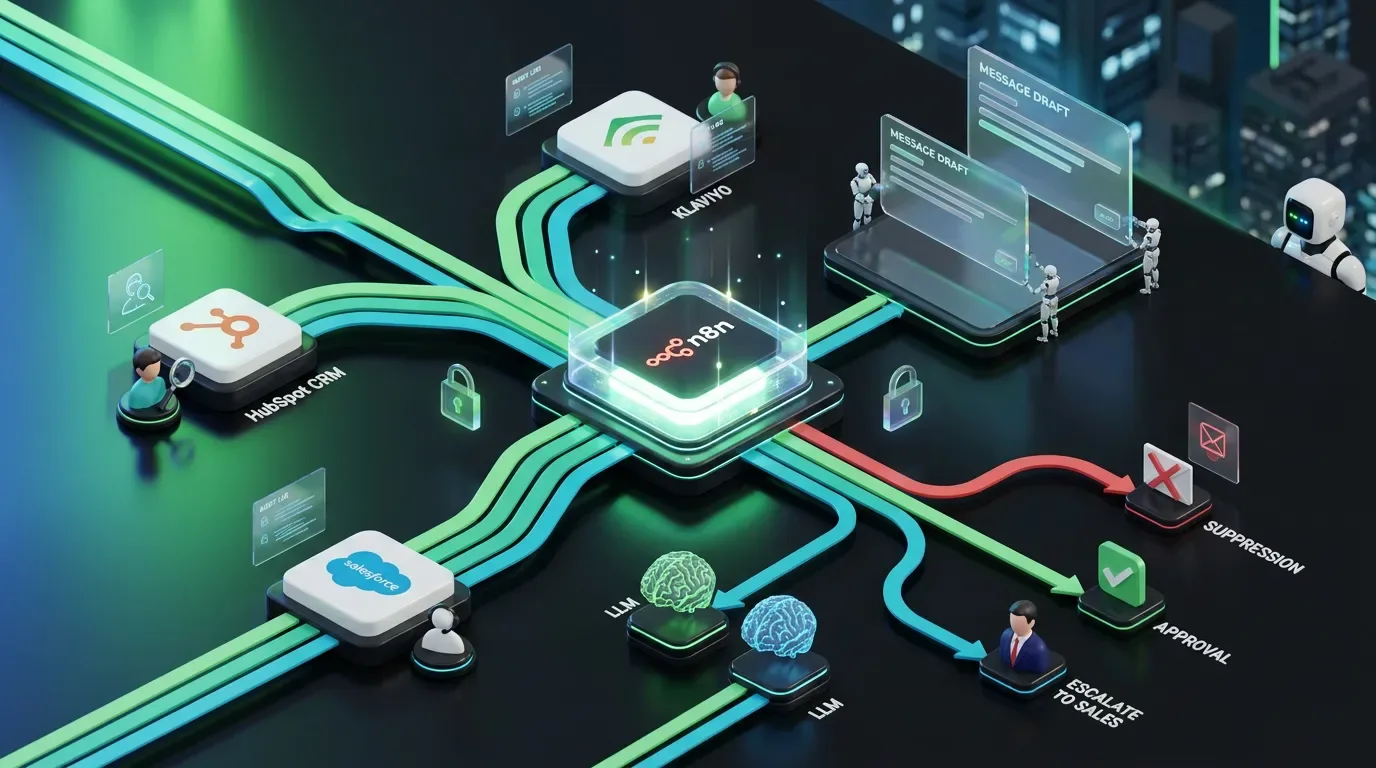
n8n is a strong orchestration layer for AI-assisted win-back campaigns because this is not a prompt trick. It is a systems problem. Most win-back campaigns fail for a very normal reason: they treat churn risk like a list problem instead of a workflow problem.
Someone exports inactive customers. Someone else writes a sad little “we miss you” email. Maybe there is a discount. Maybe there is a subject line that sounds like a chatbot recently discovered feelings. Then the campaign goes out to everyone the same way, at the same time, with the same offer, and everybody acts surprised when the results are aggressively mediocre.
A better move is to build an AI-assisted win-back workflow that reacts to customer behavior, drafts smarter recovery messages, routes risky cases to humans, and keeps your CRM from turning into a haunted museum of missed intent.
This matters even more now because platforms are pushing deeper into agentic campaign tooling. HubSpot’s Spring 2026 Spotlight updates expanded Breeze agents and Growth Context. Salesforce’s Agentforce Marketing launch is pushing the same direction. And Klaviyo’s CRM agents are leaning hard into autonomous B2C workflows. Translation: automation is getting stronger, and bad automation is getting easier too. Fun.
The goal is not fully autonomous retention marketing. It is a governed system where humans define strategy, offers, and brand rules while AI helps detect patterns, draft variants, and speed up execution.
What problem this automation solves
Win-back campaigns usually break in a few predictable places:
inactive customers are defined too broadly
support issues and product friction are ignored
everyone gets the same message regardless of why they lapsed
discounts are offered when education or reassurance would work better
teams move too slowly while intent is still recoverable
nobody logs what message logic actually led to recovery
A practical AI workflow fixes the ugly middle between customer inactivity and a relevant re-engagement attempt.
It helps you:
detect likely lapse states from CRM and product signals
classify why a customer may have disengaged
choose a win-back path based on rules first, AI second
draft channel-specific messages for email, SMS, or sales follow-up
route sensitive cases to humans before anything sends
log decisions so the system gets more useful over time
The mental model
Think of this workflow as five layers.
| Layer | What it does | Human role |
|---|---|---|
| Signal detection | Finds lapse patterns across CRM, product, support, and engagement data | Define what counts as risk or inactivity |
| Decision logic | Applies rules to choose eligible win-back paths | Set offer logic, exclusions, and timing |
| AI generation | Drafts message variants and summaries | Define voice, tone, and message constraints |
| Governance | Routes high-risk or high-value cases for review | Approve, edit, escalate, reject |
| Activation | Sends approved messages and logs outcomes | Own final send authority and measurement |
The key idea is simple: separate recovery strategy from copy generation.
If you ask AI to decide why someone churned, pick the commercial response, and write the message from raw data soup, it will improvise. Sometimes elegantly. Sometimes like a very confident intern with access to your discount codes.
Tools and systems involved
A practical stack might include:
Orchestration: n8n
CRM: HubSpot, Salesforce, or Klaviyo
Product signals: app events, subscription status, login activity, feature usage
Support signals: ticket status, CSAT, refund requests, complaint tags
Messaging channels: email, SMS, sales alerts, or customer success tasks
LLM layer: one fast structured-output model plus one stronger reasoning model for exceptions
Approval layer: Slack, Airtable, Notion, Asana, or your internal review queue
Why n8n? Because win-back automation is not a prompt party trick. It is orchestration. You need triggers, branching, suppression logic, human approvals, and logs. The model is only one part of the machine.
Where AI adds leverage
AI is useful here for interpretation and drafting, not final policy.
It can:
summarize customer state across multiple tools
classify likely lapse reasons such as price sensitivity, onboarding failure, unresolved support friction, or low product fit
suggest message angles by segment
draft channel-specific variants
rewrite copy to fit tone rules and length limits
prepare clean review packets for human approval
summarize what happened after the campaign for iteration
This matters because retention teams should not spend their day manually translating messy account history into three message variants and a guess.
Where humans must stay in control
Defining lapse criteria and recovery windows
Choosing who should never receive automated win-back outreach
Approving offer ladders and discount limits
Setting brand voice and compliance constraints
Reviewing VIP, enterprise, regulated, or complaint-heavy cases
Deciding when a human outreach path is better than automation
If your system can detect an angry customer, ignore the support context, and auto-send a cheerful discount email anyway, that is not automation. That is industrialized tone deafness.
Guardrails to define before anything goes live
| Guardrail | Implementation | Why it matters |
|---|---|---|
| Suppression rules | Exclude open complaints, legal disputes, refunds in progress, and opted-out contacts | Prevents reckless outreach |
| Offer controls | Use approved offer tables by segment and account type | Stops invented discounts and margin leaks |
| Human review tiers | Force review for high-value, high-risk, or low-confidence cases | Protects brand and customer trust |
Also useful:
set message frequency caps
require confidence thresholds before AI can recommend a path
ban unsupported inferences about personal circumstances
log every input, model output, and approval action
separate offer selection from copy generation
The workflow blueprint
Step 1: Define lapse states like an adult
Do not start with “has not opened email in 30 days.” That is lazy and often wrong.
Use a structured definition based on your business model, such as:
subscription canceled but account still active
free trial ended with no conversion
purchaser inactive beyond expected reorder window
product usage sharply declined across key features
engagement dropped after a support issue or onboarding stall
Different lapse states need different recovery logic. Wild concept, I know.
Step 2: Build a customer recovery snapshot
Before AI touches anything, normalize your data into a clean object.
{
  "contact_id": "",
  "account_type": "self_serve|mid_market|enterprise",
  "lapse_state": "trial_expired",
  "days_inactive": 21,
  "recent_behaviors": ["viewed_pricing", "stopped_using_feature_x"],
  "support_status": "closed_ticket",
  "last_sentiment": "neutral",
  "eligible_offers": ["demo_call", "extended_trial"],
  "suppression_flags": [],
  "risk_level": "medium"
}
This snapshot gives the system context instead of asking the model to reverse-engineer reality from random field debris.
Step 3: Apply rules before generation
Run deterministic logic first.
If an open complaint exists, suppress automated outreach.
If an enterprise account lapses, route to customer success first.
If a refund was issued recently, block promotional recovery messages.
If the account is eligible only for education-based recovery, do not allow discount messaging.
If consent is missing for SMS, do not get creative.
This is not what LLMs are for. This is what systems are for.
Step 4: Ask AI for structured recommendations
Do not ask, “Write a win-back email.” Ask for machine-usable output.
{
  "recommended_path": "email_offer|email_education|sms_nudge|sales_followup|hold",
  "likely_lapse_reason": "",
  "message_goal": "",
  "draft_subject": "",
  "draft_email_body": "",
  "draft_sms": "",
  "risk_flags": [""],
  "confidence_score": 0,
  "human_review_required": true
}
This lets the workflow route cleanly and makes the output auditable.
Step 5: Route by risk, value, and confidence
Not every recovery attempt deserves the same automation treatment.
Low risk: low-value self-serve accounts, no support issues, standard educational win-back path
Medium risk: discount-based recovery, product-fit uncertainty, mixed behavior signals
High risk: enterprise accounts, prior complaints, legal sensitivity, high churn value, low model confidence
Low-risk paths may go through lightweight approval. High-risk paths should stop for a human.
Step 6: Create a useful human review packet
Your reviewer should get:
customer recovery snapshot
recommended recovery path
message drafts
support and sentiment context
risk flags
approve, edit, reject, or reroute actions
Do not make someone dig through five dashboards and two Slack threads to understand why the machine suggested a retention offer.
Step 7: Activate only approved outputs
Once approved, your workflow can:
create or send the email
queue the SMS
assign a sales or CS follow-up task
update the CRM lifecycle field
log the content version and decision path
schedule a follow-up measurement check
No blind autopilot for sensitive outreach. We are trying to recover revenue, not manufacture screenshots.
What this looks like in n8n
Schedule Trigger or event-based Webhook
CRM, product, and support data pulls
Set or Function node for normalization
IF and Switch nodes for suppression and eligibility logic
LLM node for structured recommendation output
JSON validation step
Risk routing logic
Create approval task in Slack, Airtable, Notion, or Asana
Wait for approval
Send to email, SMS, or sales workflow
Post-send logging and reporting update
Model selection without making this weird
You do not need a premium reasoning model to handle every churn nudge.
| Use case | Best fit | Why |
|---|---|---|
| Classification and routing | Fast lower-cost model | Cheap structured output and summaries |
| Message drafting | Balanced model | Good tone control without premium cost |
| High-risk edge cases | Stronger reasoning model | Better nuance and abstention behavior |
This matters because agentic campaign tooling is getting easier to spin up, but cost can quietly become the villain if every tiny retention task calls the fanciest model in the room.
What good win-back copy actually does
Your message should match the reason for disengagement.
Onboarding friction: offer help, clarity, and a simple next step
Low perceived value: remind them of outcomes, not features
Price resistance: present the right offer only if policy allows it
Product confusion: reduce complexity and point to one action
Support frustration: acknowledge context and prefer human follow-up
AI helps create variants quickly, but humans still decide what kind of relationship the brand is trying to rebuild.
Tradeoffs and constraints
bad CRM hygiene will poison the workflow
AI can infer patterns, but not read minds
too many review gates will slow recovery timing
too few guardrails will create trust damage
discount-first logic can train customers to wait you out
Also, not every customer should be won back. Some should be learned from instead.
How to measure success
| Metric | What to measure | Why it matters |
|---|---|---|
| Recovery rate | Percent of lapsed users who re-engage or convert | Shows whether the workflow works |
| Time to outreach | Delay between lapse signal and approved message | Shows operational speed |
| Approval efficiency | Percent of drafts approved with minor edits | Shows whether AI is actually useful |
Why this is really a systems problem
Anybody can ask AI to write a win-back email.
The hard part is building a system where lapse signals are trustworthy, support context is visible, offer logic is controlled, message drafts are reviewable, and activation happens cleanly across the stack.
That is not a copy trick. It is a systems design problem.
Humans still define the recovery strategy, the brand posture, the commercial limits, and the moments where empathy matters more than speed. AI helps compress analysis and draft work. Automation connects the pieces so the process can repeat without collapsing into spreadsheet theater.
If you want a related COEY example, see How to Automate CRM Personalization With Control.
Humans decide who is worth winning back and why. AI helps shape the response. Systems make it repeatable.
That is how you automate win-back campaigns without turning retention marketing into a faster, shinier version of the same old nonsense.